







OS MasterMap Topography Layer® - GIS Vector Format Maps DXF | SHP | GML - Email delivery in 20 minutes
Available in GIS Format SHP | GML | GPKG | GeoTIFF and DWG | DXF format for CAD
Ordnance Survey Premium Licenced Partner • Fully Licenced official OS mapping • Scalable and Layered OS Vector Data • No sign-up needed – checkout instantly
Download Samples
GeoPackage (GPKG) ↓ GML ↓ SHP - Esri ↓ DWG - Colour ↓ All Layers | DWG ↓ OS Styling GuideOS MasterMap Topography Layer® - GIS Maps (GML / GeoPackage / SHP) & CAD Vector (DWG / DXF)
The OS MasterMap Topography® Layer is a digital mapping dataset representing over 500 million real-world features across Great Britain - roads, buildings, parks and waterways, each uniquely identified and maintained by Ordnance Survey. Built for GIS mapping and CAD-based projects that require precise spatial referencing.
Select map areas as small as 100 m × 100 m (1 hectare) to avoid unnecessary data and reduce cost. A custom rotation tool allows even tighter fitting around irregular project boundaries.
Order GIS maps online with fast delivery, flexible formats, and precision you can trust. UK Map Centre provides licensed OS MasterMap® data tailored to your area.
Always current - OS MasterMap is updated on a six-week cycle, so your base data reflects what's actually on the ground today.
Accepted for planning - OS MasterMap is the approved mapping for UK planning applications and Land Registry submissions. Using it means your site plans start from an authoritative, accepted source.
What Is a GIS Map?
A GIS map is a type of digital map used in a geographic information system (GIS) to link location data with descriptive information. These maps use vector layers to visualise spatial features, enabling users to analyse data, identify patterns and extract actionable insights.
With tools like ArcGIS and QGIS, professionals use GIS mapping in the UK to support spatial analysis, manage assets and plan land use. Ordnance Survey MasterMap data is ideal for detailed geographic information across multiple categories, helping users make better decisions with reliable mapping.
When Do I Need a GIS Map?
GIS maps are used when you need to analyse data linked to location, visualise the geography or explore patterns across a space. They guide decision-making by combining descriptive information with accurate layers of features. These maps are essential for professionals who rely on GIS technology and spatial analysis tools to assess risk, plan infrastructure or manage assets.
Typical Users Include
- Local authorities using GIS tools for planning
- Utility companies managing location data and routes
- Surveyors and engineers producing custom GIS maps
- Environmental teams modelling land use
- GIS consultants presenting data for development or policy
- Architects needing accurate site context
GIS Software Compatibility
- QGIS
- ArcGIS Pro
- ArcMap
- MapInfo
- FME
- Global Mapper
- GeoServer
- PostGIS
- Cadcorp SIS
- … all platforms that read GPKG, GML or SHP
CAD Software Compatibility
- AutoCAD by Autodesk
- Revit
- Civil 3D
- MicroStation
- BricsCAD
- Draftsight
- SolidWorks
- LibreCAD
- Adobe Illustrator
- … all CAD packages that read DWG or DXF
What's in the DWG Colour File?
- Buildings - closed polylines, filled or outline
- Roads, tracks & paths - carriageways, pavements, kerb lines
- Boundaries - land parcels, property boundaries, fences, walls
- Water - rivers, lakes, ponds, drains
- Vegetation - woodland, scrub, gardens, orchards
- Structures - bridges, steps, overhead lines, pylons
- Rail - track, platforms, signals
- Building heights - ground, eave & roof levels
- OS cartographic symbols and text labels
- OS grid frame with BNG coordinates
All Sample Downloads
GeoPackage ↓ GML ↓ GML - MapInfo ↓ SHP - Esri ↓ GeoTiff ↓ DWG - Lines ↓ DXF - Lines ↓ DWG - Colour ↓ Contours | DWG ↓ Contours | DXF ↓ DTM Points | DWG ↓ DTM Points | DXF ↓ All Layers | DWG ↓ All Layers | DXF ↓More Documents
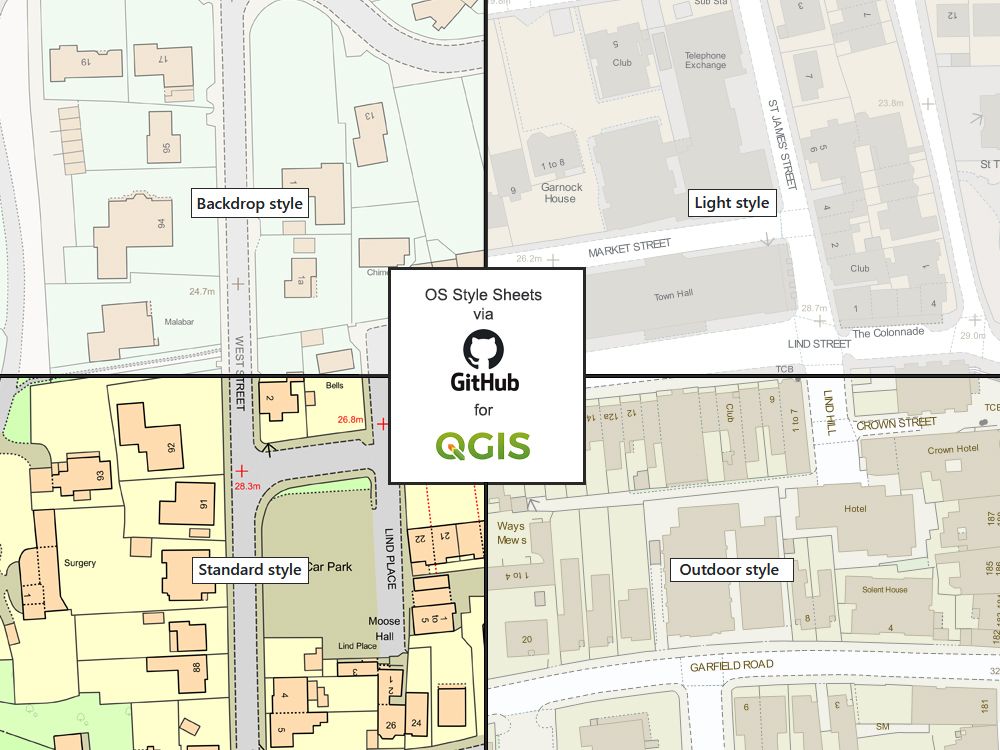
User | Starter Guide Product Overview Doc Technical Info Real World ObjectsStyling for GPKG | GML
OS GitHub Style Styling Guide Standard Styling Spec.Videos
How to Style | QGISQGIS Supporter:

AGI Member:

Alternative Products:
Extracts: PDF | JPG | TIFF - 1:1250 Extracts: PDF | JPG | TIFF - 1:2500 Aerial: PDF | TIFF | JPG - 1:1250| Product: | OS MasterMap® Topography Layer - GIS & CAD Formats |
|---|---|
| Base Mapping | OS MasterMap Topography Layer® |
| Scale | Variable, scalable in GIS and CAD |
| Coverage | Full Great Britain coverage (excludes Northern Ireland - see OSNI) |
| Format | GIS: GeoPackage, GML, GeoTiff and CAD: DWG, DXF |
| Software Required | QGIS, ArcGIS, or AutoCAD, Revit, or similar GIS tools |
| Product Price | From: £22.00 + vat |
| Delivery Method | Digital delivery by email |
| Turnaround Time | Email: Target time of 20 mins (7 days a week 7am to 11pm) - Larger files may take longer to generate |
| Currency | Current - Latest available direct from Ordnance Survey |
| Samples | Click here to download sample | GeoPackage Click here to download sample | GML Click here to download sample | GML-MapInfo Click here to download sample | Esri-shp Click here to download sample | GeoTiff Click here to download sample | DWG Colour Click here to download sample | DWG Click here to download sample | DXF Click here to download sample - Mastermap with Contours & DTM | DXF |
| Key Features | Includes North arrow, Scale bar, Licence number, National grid coordinates |
| Uses | Designed for GIS software, the OS MasterMap® Topography Layer is delivered in layered vector formats, enabling professionals to produce accurate maps and run spatial analysis. Available in multiple formats with optional elevation data (contours or DTM). The formats available support land planning, infrastructure design, and terrain modelling. Extended licence terms are available from 1 to 3 years. |
| Number of Printouts | Unlimited use across GIS or CAD for the duration of your licence (1, 2 or 3 years). |
| Options Info | Contours are derived from the OS Terrain® 5 and are not subject to Ordnance Surveys accuracy/specifications and are designed to provide a 2 dimensional guideline only. For 3D modeling use the DTM points as they have a Z(height) value attached to them |
| Licence Term | Please go to the Licence tab below |
| OS Terrain (Height)Accuracy | OS Statement: OS Terrain® has been measured against with GPS points in a range of sample areas to provide a root mean
square error (RMSE) value for the height points in each geographic area; urban and major communication
routes, rural, and mountain and moorland. Urban and major communication routes = 1.5 metres RMSE* Rural = 2.5 metres RMSE Mountain and moorland = 2.5 metres RMSE * Root mean square error. This is the average of the mean heights collected in a sample area. The contours are generated from the OS Terrain® 5 using a third party application. They are not subject to Ordnance Surveys accuracy / specifications and are designed to provide a 2 dimensional guideline only. |
| OS Terrain (Height Option): Further Reading | OS Terrain 5 User Guide | OS Doc |
LICENSING AND LEGAL
Ordnance Survey Licensing
This product is supplied under UK Map Centre’s Framework agreement with Ordnance Survey (Distribution Contract)
You do not need your own licence to use or buy this product. All maps are issued with a unique licence number and can be included in formal planning submissions.
Approved submissions include:
- Local Authority (including the Planning Portal),
- Land Registry,
- Electricity Board or other body.
| Item | Permitted | Alternative Product / Notes |
|---|---|---|
| Digital submission to any online planning portal | Export at required scales, e.g. 1:500, 1:1250, 1:200, from a single purchased file. | |
| Add basic content to this Product -i.e. outline a property in red for purposes of planning permission. | Within a GIS setup or CAD package | |
| GIS Use | Data is already georeferenced | |
| Ready for CAD | Data is already georeferenced | |
| Printing Extra Copies | Unlimited outputs or scales via your software within the license term. | |
| Permit your Contractors to use the purchased Licensed Data | Submit Contractor Form. Select the number of users or terminals before purchase for compliance - see Contractor Form .docx below. |
FREQUENTLY ASKED QUESTIONS
What’s the difference between GIS formats like GeoPackage, GML, Shapefile, and GeoTIFF?
Different GIS map formats each serve unique purposes depending on your system and project.
GeoPackage: A modern, open-source format ideal for advanced GIS analysis, spatial databases, and mobile mapping.
GML: An XML-based format designed for detailed data exchange and interoperability between various GIS applications.
Shapefile (SHP): A widely supported vector format suitable for standard GIS workflows, mapping, and spatial queries.
GeoTIFF: A simple raster image format ideal for basic visualisation, elevation display, and easy compatibility across GIS viewers and software.
Can I access GIS map services online for my area?
Yes. You can search by postcode, boundary, or county to order Ordnance Survey MasterMap data online. Our website provides fast access to licensed map services, with layered data ready for use in your preferred program.
Can you provide OS data clipped specifically to my Shapefile boundary?
Yes, we can supply OS data precisely clipped to your provided Shapefile boundary, beneficial for large-scale or specific-area projects. However, due to Ordnance Survey pricing structures, it can often be just as cost-effective to select a slightly larger standard coverage area.
How often is OS MasterMap updated?
Ordnance Survey’s MasterMap Topography Layer is maintained through continuous and cyclic revision, with updates delivered every six weeks on average. Continuous revision captures new infrastructure developments (e.g. buildings and roads) within six months, while natural features are updated in regular cycles.
This ensures your GIS mapping system remains current for spatial analysis, planning and accurate geographic information.
What level of accuracy can I expect from OS MasterMap?
OS MasterMap is exceptionally accurate for a national-scale dataset. GIS features are recorded to within ~1 m relative accuracy in urban areas and up to ±2.5 m in rural or moorland regions, meeting high standards of positional precision.